 Türkçe
 Deutsch
Journal Entry Examples: Which Transaction Goes to Which Account, and Why?
A sales invoice goes to 120, 600 and 391; a purchase invoice to 153, 191 and 320. We explain which side each account works on, common journal entry examples in the Turkish Uniform Chart of Accounts, and how accounting software builds these entries through accounting links.
What Is a Journal Entry?
Every transaction that moves money, goods or debt in a business is recorded in the books: an invoice issued, a transfer received, an expense paid in cash, goods leaving the warehouse. Each entry affects at least two accounts. One account is debited, another is credited, and the two sides always add up to the same amount. We explained the logic of double-entry bookkeeping in What Are Debit and Credit in Accounting?
In Türkiye, account names and numbers come from the Uniform Chart of Accounts (Tek Düzen Hesap Planı): 100 Cash, 120 Trade receivables, 600 Domestic sales and so on. The type of account decides which account a transaction goes to, and the rules for that type decide which side it goes on. In this article you will find the rules first, then journal entry examples for the most common transactions, and finally how accounting software builds these entries on its own through accounting links. The examples show general practice in Türkiye; ask your accountant about anything specific to your business.
Which Side Does an Account Work On?
You do not need to memorise whether an account is debited or credited. It is enough to know what the account shows:
| Account type | Example accounts | Increase | Decrease |
|---|---|---|---|
| Assets (accounts starting with 1 and 2) | 100 Cash, 102 Banks, 120 Trade receivables, 153 Trade goods, 191 Deductible VAT | Debit | Credit |
| Sources: liabilities and equity (3, 4 and 5) | 320 Trade payables, 360 Taxes and funds payable, 391 Calculated VAT | Credit | Debit |
| Income (60, 64 and 67) | 600 Domestic sales, 601 Export sales | Credit | Debit |
| Deductions from sales (61) | 610 Sales returns, 611 Sales discounts | Debit | Credit |
| Expenses and costs (62, 63, 65, 66, 68 and 7) | 621 Cost of trade goods sold, 770 General administrative expenses | Debit | Credit |
Asset accounts show what the business has: cash in the till, money in the bank, amounts customers owe, goods in the warehouse. Source accounts show to whom the business owes these assets: suppliers, the state, the owners. Income accounts work on the credit side because income increases equity; expense accounts work on the debit side because expenses reduce it. Sales returns and sales discounts reduce income, so they sit on the debit side like expenses.
The two VAT accounts are a good example of the rule. The VAT you collect from a customer on a sale belongs to the state, not to you; what you owe the state increases, so 391 Calculated VAT (output VAT) is credited. The VAT you pay a supplier on a purchase will be deducted on your VAT return; it is a kind of receivable, so 191 Deductible VAT (input VAT) is debited.
Which Transaction Goes to Which Account?
Below are the journal entries for the most common transactions. The accounts are main accounts of the Uniform Chart of Accounts; businesses open sub-accounts under them (for example a sub-account such as 120.01.104 for each customer).
| Transaction | Debit | Credit |
|---|---|---|
| Domestic sales invoice | 120 Trade receivables (total including VAT) | 600 Domestic sales (net amount), 391 Calculated VAT |
| Export invoice | 120 Trade receivables | 601 Export sales |
| Sales return | 610 Sales returns, 191 Deductible VAT | 120 Trade receivables |
| Purchase of goods for resale | 153 Trade goods, 191 Deductible VAT | 320 Trade payables |
| Expense invoice | 770 General administrative expenses or the relevant expense account, 191 Deductible VAT | 320 Trade payables, or 100 Cash if paid |
| Bank transfer from a customer | 102 Banks | 120 Trade receivables |
| Cash received from a customer | 100 Cash | 120 Trade receivables |
| Cheque received from a customer | 101 Cheques received | 120 Trade receivables |
| Card payment received | 108 Other cash equivalents | 120 Trade receivables |
| Bank transfer to a supplier | 320 Trade payables | 102 Banks |
| Cash paid into the bank | 102 Banks | 100 Cash |
| Cost of goods sold | 621 Cost of trade goods sold | 153 Trade goods |
| Goods missing at stocktaking | 197 Inventory count shortages | 153 Trade goods |
| Extra goods found at stocktaking | 153 Trade goods | 397 Inventory count surpluses |
The expense accounts in the table follow option 7/A, where expenses are tracked by function in accounts such as 760 Marketing, selling and distribution expenses and 770 General administrative expenses. Businesses using option 7/B record expenses by nature in accounts 790–798.
Journal Entry Examples
The examples use a VAT rate of 20% and amounts in TRY. Under each entry you will find why each account is on its side.
Sales invoice
Goods worth TRY 40,000 plus TRY 8,000 VAT were sold to a customer.
| Account | Debit | Credit |
|---|---|---|
| 120 Trade receivables | 48,000 | |
| 600 Domestic sales | 40,000 | |
| 391 Calculated VAT | 8,000 |
Why? The customer now owes you TRY 48,000; your receivable (an asset) increased, so 120 is debited. Sales income arose, and income goes on the credit side. The VAT will be paid to the state; what you owe increased, so 391 is credited.
If the invoice has a discount, the gross sale can go to 600 and the discount to 611 Sales discounts. On a TRY 1,000 sale with a 10% discount, 120 is debited 1,080, 611 debited 100, 600 credited 1,000 and 391 credited 180. The income statement then shows gross sales and the discounts given separately.
Purchase invoice
Goods for resale worth TRY 50,000 plus TRY 10,000 VAT were bought from a supplier.
| Account | Debit | Credit |
|---|---|---|
| 153 Trade goods | 50,000 | |
| 191 Deductible VAT | 10,000 | |
| 320 Trade payables | 60,000 |
Why? The goods in the warehouse increased; 153 is an asset and is debited. The VAT paid will be deducted from the calculated VAT on the return; 191 is debited. What you owe the supplier increased; 320 is a source account and is credited.
What you bought decides the account: goods for resale go to 153 Trade goods, raw materials for production to 150 Raw materials and supplies, a computer for use in the business to 255 Fixtures and fittings, and materials or services that are used up to an expense account. On a purchase with VAT withholding (tevkifat), the withheld VAT is not paid to the supplier; it is credited to 360 Taxes and funds payable and the amount going to 320 is reduced by the same amount.
Expense paid in cash
Office stationery worth TRY 2,000 plus TRY 400 VAT was bought and paid from the till.
| Account | Debit | Credit |
|---|---|---|
| 770 General administrative expenses | 2,000 | |
| 191 Deductible VAT | 400 | |
| 100 Cash | 2,400 |
Why? The stationery was not bought for resale; it will be used up, so it goes to an expense account, not to stock. Expenses work on the debit side. The cash in the till decreased; cash is an asset and is credited. If the invoice were to be paid later instead of at once, 320 Trade payables would be credited instead of 100 Cash.
Receipts and payments
The customer from the sales invoice paid TRY 48,000 by bank transfer, and TRY 60,000 was transferred to the supplier from the purchase invoice.
| Account | Debit | Credit |
|---|---|---|
| 102 Banks | 48,000 | |
| 120 Trade receivables | 48,000 | |
| 320 Trade payables | 60,000 | |
| 102 Banks | 60,000 |
Why? On the receipt, money in the bank increased (102 debit) and the amount the customer owed was settled (120 credit). On the payment, what you owed the supplier was settled (320 debit) and money in the bank decreased (102 credit). A receipt is not income: the income was already recorded in 600 with the sales invoice. The receipt only turns a receivable into cash.
If the customer pays by cheque, 101 Cheques received is debited and 120 credited first; when the cheque is collected at the bank on its due date, 102 is debited and 101 credited. With a card payment, the money waits in 108 Other cash equivalents until it reaches the bank. When the bank transfers it to your account, 102 is debited and 108 credited. The commission deducted is debited to an expense account; agree with your accountant which one to use.
Cost of goods sold
The goods on the sales invoice cost TRY 30,000.
| Account | Debit | Credit |
|---|---|---|
| 621 Cost of trade goods sold | 30,000 | |
| 153 Trade goods | 30,000 |
Why? The goods left the warehouse; 153 decreased and is credited. The cost of the goods is now an expense; 621 is debited. With this entry the income statement deducts TRY 30,000 of cost from TRY 40,000 of sales and shows a gross profit of TRY 10,000. Without the cost entry the whole sale looks like profit, and goods that are no longer in the warehouse stay in 153.
Businesses that keep stock on a perpetual inventory system record the cost with every sale; under a periodic system the cost is found by counting at the end of the period. For the other year-end entries, see our article year-end closing step by step.
What Are Accounting Links?
You do not have to build the entries above by hand for every invoice. A record in your day-to-day bookkeeping already holds everything needed to find the account: the invoice’s customer or supplier, the products on its lines, their VAT rates; the cash register or bank account of a receipt. Accounting links are the mappings you define once to say which ledger account each of these goes to. The software builds every record’s voucher from these links.
| Information on the record | Linked account | Example sub-account |
|---|---|---|
| Customer | 120 Trade receivables | 120.01.104 Ege Metal |
| Supplier | 320 Trade payables | 320.01.211 Demirtaş Çelik |
| Product or product group, on sales | 600 Domestic sales | 600.01 |
| Product or product group, on purchases | 153 Trade goods | 153.01 |
| VAT rate | 391 on sales, 191 on purchases | 391.01 Calculated VAT 20% |
| Cash register | 100 Cash | 100.01 Main cash desk |
| Bank account | 102 Banks | 102.01 TRY current account |
| Expense or expense group | 770 General administrative expenses | 770.01 |
Links are set on three levels, from general to specific:
- Default account: Applies to every record of a type. For example, all sales go to 600.01.
- Group account: An account for a customer group, product group or expense group that differs from the default. For example, the supplier group goes to 320, and service products go to a separate service sales account under 600.
- Record account: An account for a single customer, product, cash register or bank account. Each customer having its own sub-account under 120 is the most common example.
The search starts with the most specific level: if there is a link for the record, it is used; otherwise the group’s link; otherwise the default account. Most records are therefore posted with the default accounts, and you add links only for what needs to be tracked differently.
Common Mistakes with Links
- Suppliers left in 120. If every customer and supplier is linked to the same account, what you owe suppliers shows up as credit balances in 120 Trade receivables. On the balance sheet, both receivables and payables come out lower than they really are. Link suppliers to 320 Trade payables, and agree with your accountant on a rule for parties that are both customers and suppliers.
- Expenses going to stock. If stationery, fuel or cleaning supplies are set up as products and linked to 153, stock is inflated, expenses look too low and profit comes out higher than it is. Set up purchases that will not be resold as expenses and link them to an expense account.
- All VAT in one account without separating rates. A separate sub-account for each rate (for example 391.01 for 20%, 391.02 for 10%, 391.03 for 1%) makes it easier to compare the VAT return with the books.
- Forgetting the cost of goods sold. If sales invoices are posted but no cost entry is made, 621 stays empty and 153 shows goods that are no longer there. At month end, compare the 621 and 153 balances in the trial balance with your stock report.
- Posting to a main account. Entries go to sub-accounts; a main account such as 120 only shows the total of its sub-accounts. If a link points to a main account, you lose track of each customer.
Accounting Links in Noyax
In Noyax, links are on the Definitions › Accounting › Accounting links screen. The link types are listed on the left: Customer, Cash register, Bank, POS blocked, cheque and note accounts, domestic and export sales, sales returns, sales discounts, cost of goods sold, product purchase, count surplus and inventory shortage, calculated and deductible VAT, additional taxes, taxes and funds payable, expense. Each type shows its default account and the number of record-specific links; a type without an account shows a red Not defined. On the right are the selected type’s default account and its custom links.
When the Uniform Chart of Accounts is set up, the default accounts come ready: customer 120, cash 100, bank 102, domestic sales 600.01, product purchase 153, VAT 191 and 391, and so on. Most businesses review them and add custom links only where they want to track something differently.
| Type | Order (the first one found is used) |
|---|---|
| Customer | Account specific to the customer, the customer’s group detail, the customer’s group, default account |
| Product and expense types | Account specific to the product or expense, its groups (Group 1 to Group 5), default account |
| Cash register, bank and POS blocked | Account specific to the cash register or bank account, default account |
| Calculated and deductible VAT | Account specific to the VAT rate, default account |
| VAT withholding | The rate’s item (for example 5/10), the all-rates item, default account of taxes and funds payable |
Records are posted on the Accounting › Posting screen. The vouchers to be created appear first in a preview; the accounts have been found from the links, and you can change them in the preview if you need to.
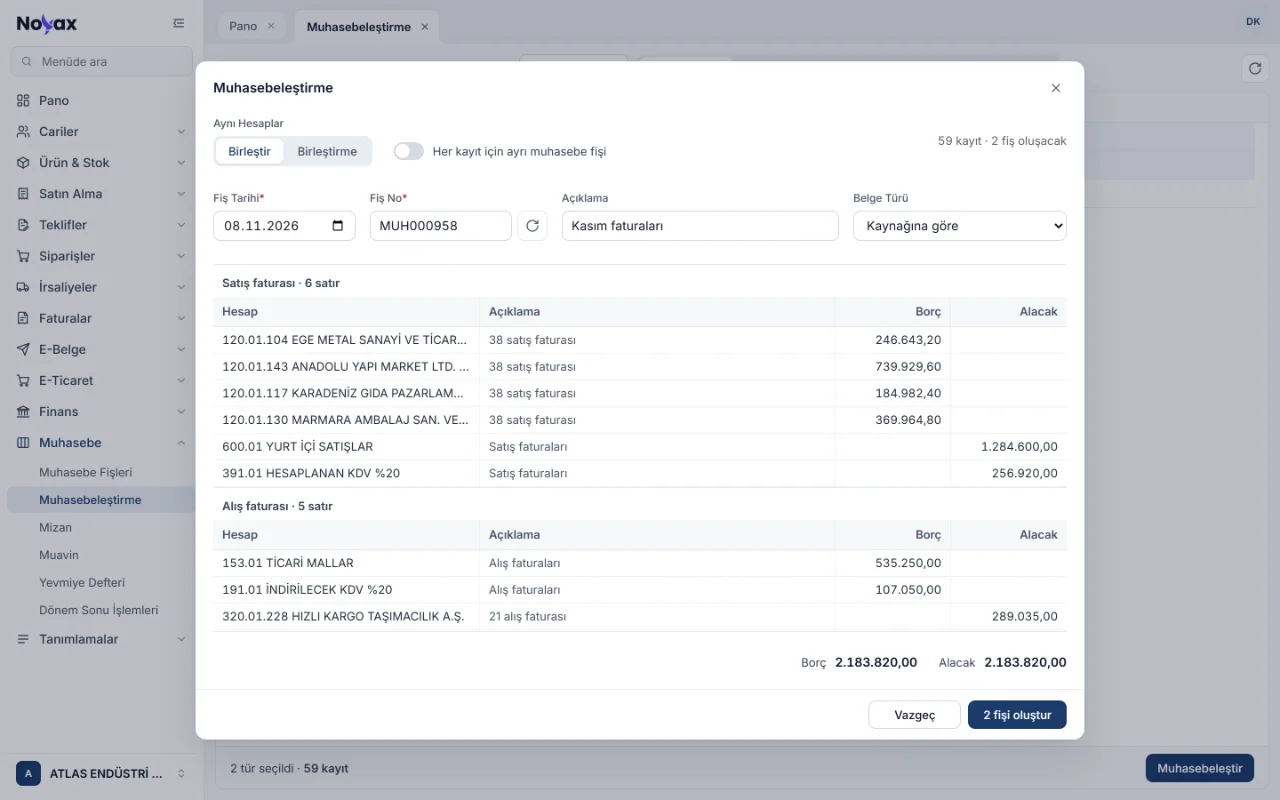
- A missing link never creates half a voucher. A record whose account cannot be found is not posted, and the preview says why, for example “Stationery: expense link is not defined.” The other records are posted; once you add the link and open the preview again, the waiting record is posted too.
- Links can also be set from cards. The specific account chosen in the Accounting panel of the customer card and on the Tax/Accounting tab of the product card is the custom link on this screen; change one and the other changes too.
- Suppliers are separated into 320. On the Definitions › Customer › Customer groups screen, create a Suppliers group detail and assign it to your suppliers. Then link the account under 320 to this group detail in the Customer type.
- Links belong to a period. If the new period’s chart of accounts is copied from the previous period, the links are carried over too. The links of a closed period can only be viewed.
Details of posting, the trial balance and year-end closing are on our general ledger page. Try Noyax free for 14 days and see which accounts your invoices go to before the vouchers are created.
Key Takeaways
- In every journal entry, total debits equal total credits. The type of account decides the side: assets increase on the debit side, sources and income on the credit side, expenses on the debit side.
- On a sales invoice, 120 is debited and 600 and 391 credited; on a purchase invoice, 153 and 191 are debited and 320 credited.
- Receipts and payments are not income or expenses; they only settle a receivable or a payable.
- The cost of goods sold is a separate entry: 621 debit, 153 credit. Without it, profit and stock look higher than they are.
- Accounting links define once which account customers, products, VAT rates, cash registers, bank accounts and expenses go to. The most specific link is used first, then the group’s, then the default account.
Frequently Asked Questions
How is a sales invoice recorded?
The total including VAT is debited to 120 Trade receivables, the amount excluding VAT credited to 600 Domestic sales and the VAT credited to 391 Calculated VAT. Export sales go to 601 Export sales.
Which account does a purchase invoice go to?
It depends on what was bought: goods for resale are debited to 153 Trade goods, raw materials to 150 Raw materials and supplies, fixtures to 255 Fixtures and fittings, and materials and services that are used up to an expense account. The VAT is debited to 191 Deductible VAT and the total credited to the supplier’s account under 320 Trade payables.
What is the difference between 120 Trade receivables and 320 Trade payables?
120 Trade receivables is an asset account showing what customers owe you, and it has a debit balance. 320 Trade payables is a source account showing what you owe suppliers, and it has a credit balance. If customers and suppliers are not linked to the right account, receivables and payables on the balance sheet look as if they had been netted off against each other.
What is the difference between 191 and 391?
191 Deductible VAT is the VAT paid on purchases, 391 Calculated VAT the VAT charged on sales. At month end they are offset: 391 is debited and 191 credited. If calculated VAT is larger, the difference is credited to 360 Taxes and funds payable and paid; if deductible VAT is larger, the difference is debited to 190 VAT carried forward and carried into the next month.
Why is a receipt not recorded as income?
Income arises at the time of sale, with the invoice, and is recorded in 600. A receipt only turns the customer’s debt into cash: the bank or cash account increases and 120 Trade receivables decreases. Recording the receipt as income as well would count the same sale as income twice.
What does “link is not defined” mean?
The accounting software could not find an account for part of the record: for example, an expense, a VAT rate or a customer has no link. In Noyax such a record is not posted, and the message tells you which type is missing. Once you give that type a default account on the accounting links screen, or add a record-specific account, the record is posted.