Build to recipe, trace every part

Define once in a recipe what is consumed and what is produced. From the order to material requirements, from the production slip to shipping, every step uses the recipe; with lots and serial numbers every part is traceable both ways.

Sold as an add-on; included in Enterprise. Details

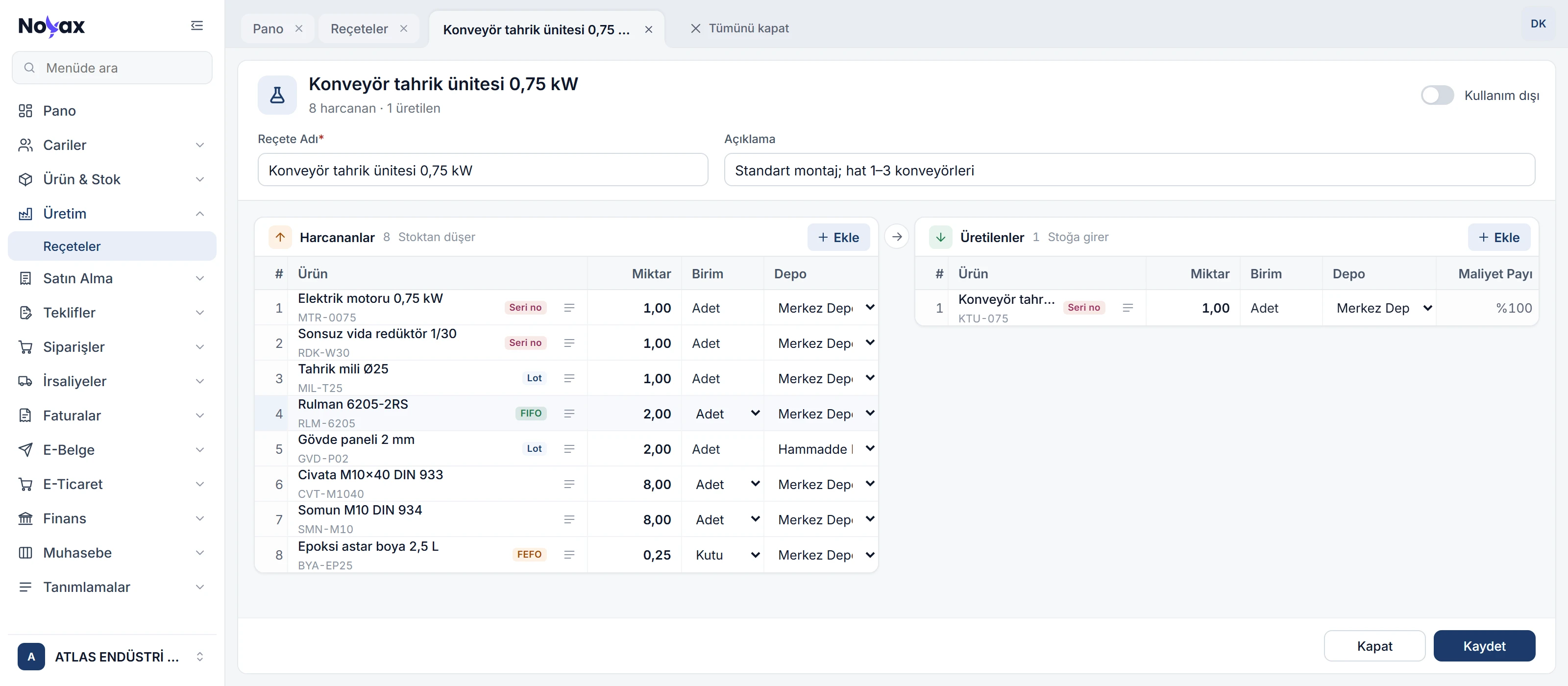
Recipe card for the 0.75 kW conveyor drive unit: eight consumed items on the left with quantity, unit and warehouse (electric motor and gearbox tagged serial no., bearing FIFO, drive shaft and housing panel lot, paint FEFO), the produced unit on the right

From finished product to raw material, from raw material to customer

Tap a lot, a serial number or a customer. Backward, you see who supplied the parts inside, when and at what price; forward, which units they went into and which customer received them.

Backward · where it came from Forward · where it went

Tap a record; its trace lights up both ways.

PurchasingReceived by lot and serial no.

CuttingHousing panel 2 mm

AssemblyConveyor drive unit 0.75 kW

ShippingSales order

Backward · where it came from

  • Bearing 6205-2RS FIFO LOT002914 Teknik Yedek Parça San. Ltd. Şti. · 27/10/2026 · 84.50 TRY / pc
  • Bearing 6205-2RS FIFO LOT002917 Orbit Endüstriyel Tedarik A.Ş. · 13/11/2026 · 2.45 USD / pc
  • Electric motor 0.75 kW Serial no. M24-08813 Yıldız Elektrik Motor San. A.Ş. · 08/11/2026 · 9,850.00 TRY / pc
  • DKP steel sheet 2 mm Lot LOT003105 Kocaeli Çelik Servis Ltd. Şti. · 04/11/2026 · 2,140.00 TRY / pc

Forward · where it went

  • Kuzey Paketleme A.Ş. KTU-0143 Order SO-0418 · delivery note 21/11/2026

The example shows the motor, bearing and sheet metal records of the units; every tracked item in the recipe is traced the same way.

One production run, several products

Consumed items sit on the left of the recipe, produced items on the right, and a single run can produce several items. Cutting sheet metal yields housing panels, cover plates and saleable scrap in one recipe.

  • The cost share is the percentage of the consumed items' cost assigned to each product; shares add up to 100%, and 0% marks a by-product that carries no cost.
  • Products without a typed share split the remainder equally; a bar shows the split and any gap.
  • Quantities are for a multiple of the recipe: one sheet, eight panels.
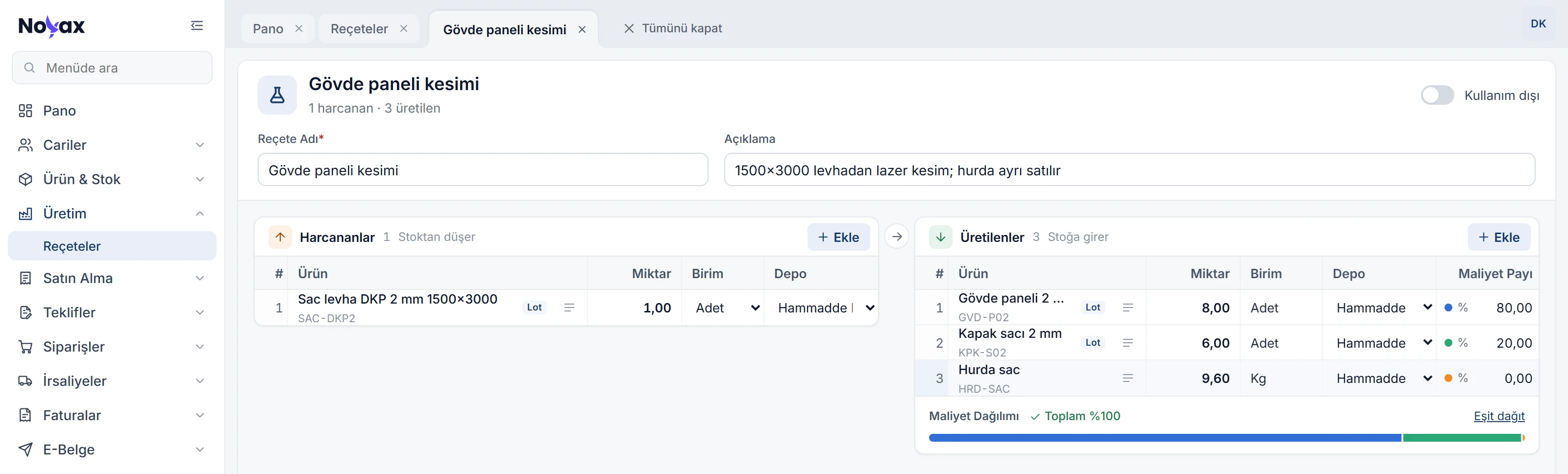
Housing panel cutting recipe: one steel sheet is consumed; housing panel at 80%, cover plate at 20% and scrap at 0% cost share are produced; below, the cost split bar and Total 100% Enlarge image

From order to production

In make-to-order production the sales order starts the work: the product and quantity on the order are the input, and the recipe works out the rest. Every lot and serial number shipped stays traceable to the order it went to.

Conveyor drive unit 0.75 kW · open sales orders
Order Customer Due Quantity
SO-0441 Kuzey Paketleme A.Ş. 04/12/2026 4 pcs
SO-0446 Ege Gıda Makine Ltd. Şti. 08/12/2026 6 pcs
SO-0452 Bursa Lojistik Depolama A.Ş. 16/12/2026 3 pcs
Total 13 pcs
In stock · KTU-0145 1 pc
To produce 12 pcs

Material requirements by recipe

Enter the quantity you want to produce; requirements analysis works out how much of each recipe item is needed and compares it with stock. Shortages show up before production starts, so you can start purchasing or semi-finished production in time.

For 12 conveyor drive units 0.75 kW
Item Required In stock Short
Electric motor 0.75 kW 12 pcs 11 pcs 1 pc
Worm gearbox 1:30 12 pcs 7 pcs 5 pcs
Drive shaft Ø25 12 pcs 18 pcs —
Bearing 6205-2RS 24 pcs 1,620 pcs —
Housing panel 2 mm 24 pcs 10 pcs 14 pcs
Bolt M10×40 DIN 933 96 pcs 24,600 pcs —
Nut M10 DIN 934 96 pcs 9,800 pcs —
Epoxy primer 2.5 L 3 cans 342 cans —

The 14 missing housing panels are cut from two sheets with their own recipe.

Production slip from the recipe

On the production slip you pick the recipe and enter the quantity produced; the recipe quantities are multiplied accordingly. When the slip is saved, consumed items leave their warehouses and the product goes into stock.

  • On the slip you can change the quantities from the recipe, delete lines or add new items.
  • For items tracked by lot or serial number the slip records which lot or serial number was used; with FIFO, LIFO and FEFO the lot is picked automatically.
  • The product is tracked too: each unit goes into stock with its own serial number, each batch with its own lot.
PS-0131 · 3 conveyor drive units 0.75 kW
Item Recipe Slip Lot / serial no.
Electric motor 0.75 kW 1 pc 3 pcs M24-08813, 08814, 08815
Worm gearbox 1:30 1 pc 3 pcs R30-1172, 1173, 1174
Drive shaft Ø25 1 pc 3 pcs LOT003098
Bearing 6205-2RS 2 pcs 6 pcs LOT002914 · 1, LOT002917 · 5
Housing panel 2 mm 2 pcs 6 pcs LOT003128
Bolt M10×40 DIN 933 8 pcs 24 pcs —
Nut M10 DIN 934 8 pcs 24 pcs —
Epoxy primer 2.5 L 0.25 cans 0.75 cans LOT002732
Conveyor drive unit 0.75 kW 1 pc 3 pcs KTU-0143, 0144, 0145

Bearings are tracked FIFO: the last piece of the older lot is used up before the newer lot.

All recipes in one list

The recipe list shows consumed and produced items side by side. Type an item's name or code into the filter of either column to list every recipe that uses it.

  • Save as opens a new recipe from a copy of an existing one.
  • A recipe you no longer use can be set out of use; it leaves the list without being deleted.
  • A recipe used in production cannot be deleted, and neither can the items, units and warehouses in a recipe.
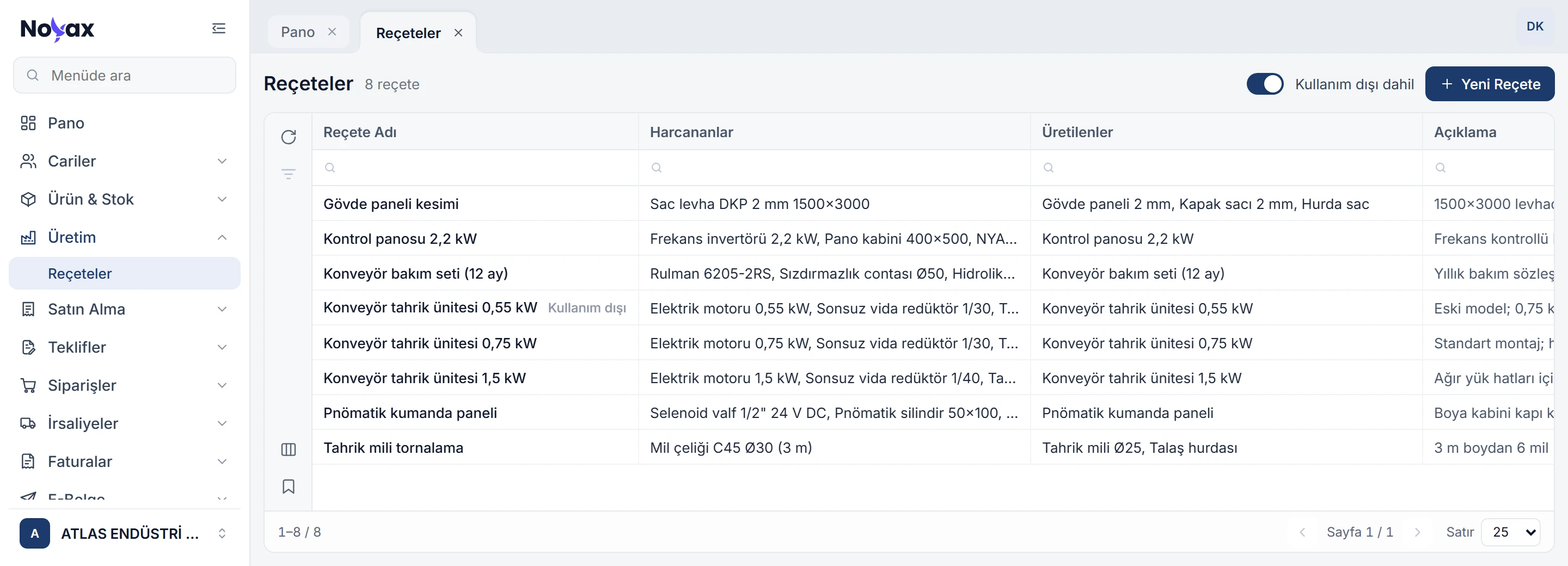
Recipe list: eight recipes with their consumed and produced items; Include out of use is on and the old 0.55 kW recipe is tagged Out of use Enlarge image

More manufacturing features

Tracking methods
Each item can be tracked by lot, FIFO, LIFO, FEFO or serial number; the method shows as a tag next to the item in the recipe.
Expiry dates
For items tracked by lot or FEFO, issuing an expired lot shows a warning; FEFO uses the lot closest to expiry first.
Warehouse per line
The recipe sets the warehouse each consumed item comes from and each product goes into; leave it empty to choose it at production.
Multiple units
A recipe can use any of the item's units: cable in metres, paint in cans.
Fast keyboard entry
Enter moves to the next cell and Ctrl+Enter adds a line; F4 opens the item list and F2 saves the recipe.
Recipes don't touch stock
A recipe is a definition; saving it does not affect stock, accounts or the ledger. Stock changes with the production slip.
Errors before saving
An item entered twice, an item both consumed and produced, or shares that don't add up to 100% show up before saving, and the line number turns red.
Record info
Every recipe shows who created it and who last changed it.

Start production with your recipes.

Once your products, tracking methods and recipes are in place, the first production slip takes minutes. Every item tracked by lot or serial number carries its own history from the first purchase to the last shipment.

  1. Choose tracking methods

    On the product card you set how each item is tracked: no tracking, lot, FIFO, LIFO, FEFO or serial number.

  2. Enter your recipes

    For each finished product you define what is consumed and what is produced, with quantities, units and warehouses.

  3. Post your first production

    Pick the recipe and enter the quantity produced; consumed items leave stock and the finished product goes in.

Track production end to end.

Try it free for 14 days. No credit card needed.