
Connect Noyax to your own software

With the Noyax API, your online store, warehouse or field software talks to Noyax directly: it reads customers and products, creates invoices, orders and delivery notes, and fetches stock levels and customer balances.

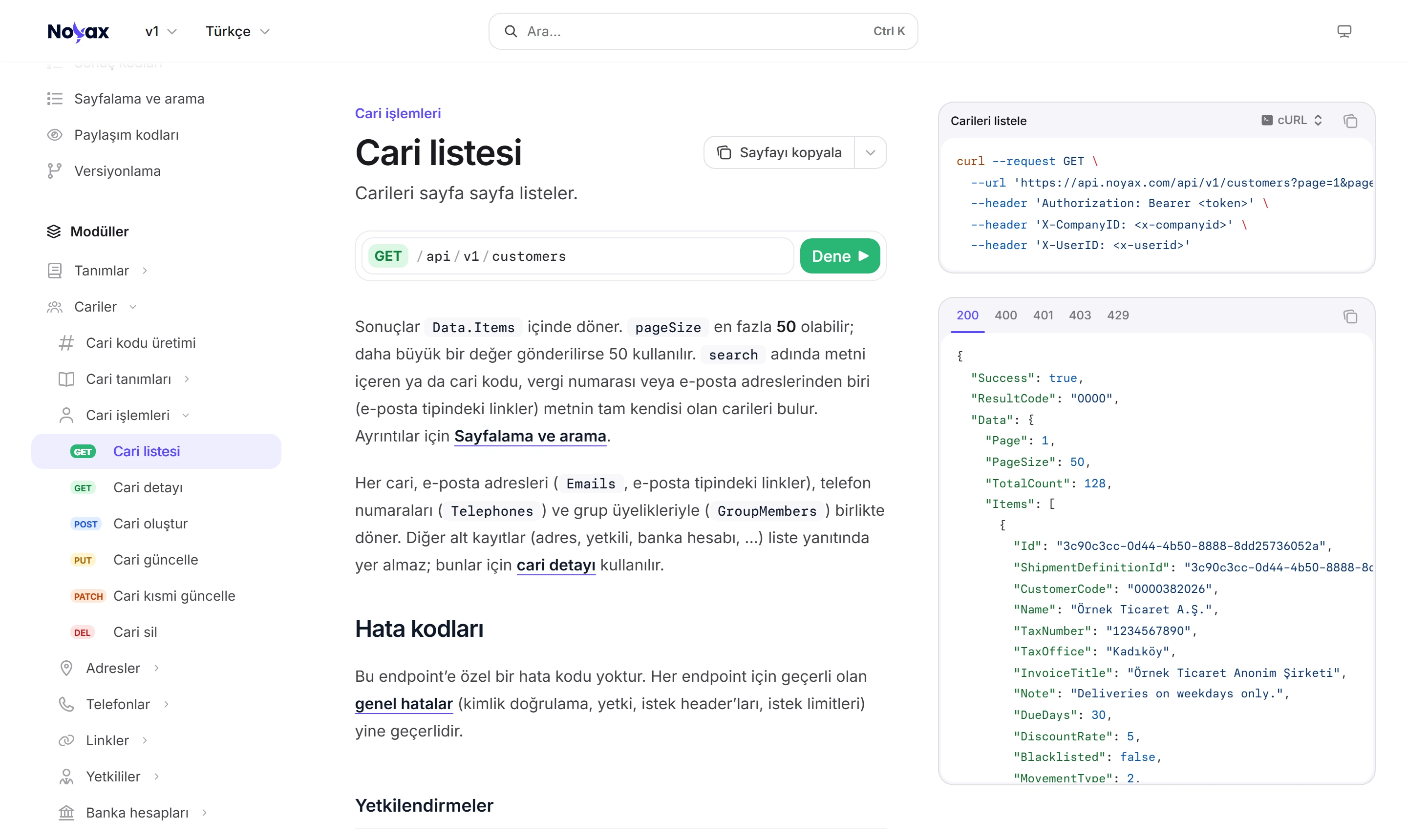
Customer list page in the Noyax API technical documentation: the GET /api/v1/customers endpoint, a curl request and the JSON body of the 200 response

One request, one response

Pick a call: see the request as a curl command and the response as the JSON Noyax returns. Field names are the API’s own; values are examples.

GET /api/v1/customers

Customers come page by page, up to 50 records per page. search looks in customer names and finds the customer whose code, tax number or e-mail address matches exactly.

Request

curl "https://api.noyax.com/api/v1/customers?search=paketleme&pageSize=10" \
  -H "Authorization: Bearer ACCESS_TOKEN" \
  -H "X-UserID: 12" \
  -H "X-CompanyID: 3"

Response 200 OK

{
  "Success": true,
  "ResultCode": "0000",
  "Message": null,
  "Data": {
    "Page": 1,
    "PageSize": 10,
    "TotalCount": 2,
    "Items": [
      {
        "Id": "8d2f4a61-3c7e-4b19-a5d0-6e1f9b2c7a43",
        "CustomerCode": "C0042",
        "Name": "Kuzey Paketleme A.Ş.",
        "TaxNumber": "6120458731",
        "TaxOffice": "Nilüfer",
        "DueDays": 30,
        "RiskLimit": 250000
      },
      {
        "Id": "e17a0c35-92b4-4d6f-8a1e-3b5c9d0f2a68",
        "CustomerCode": "C0057",
        "Name": "Marmara Paketleme Ltd. Şti.",
        "TaxNumber": "6094127358",
        "TaxOffice": "Gebze",
        "DueDays": 45,
        "RiskLimit": 150000
      }
    ]
  }
}
GET /api/v1/stock/products/status

The quantity on hand with its lot and serial number breakdown. With warehouseName only that warehouse is counted; ask by product ID, code or online store code.

Request

curl "https://api.noyax.com/api/v1/stock/products/status?productCode=RLM-6205&warehouseName=Merkez%20Depo" \
  -H "Authorization: Bearer ACCESS_TOKEN" \
  -H "X-UserID: 12" \
  -H "X-CompanyID: 3"

Response 200 OK

{
  "Success": true,
  "ResultCode": "0000",
  "Message": null,
  "Data": {
    "UnitCode": "C62",
    "Quantity": 1620,
    "Lots": [
      {
        "LotNo": "LOT002917",
        "Quantity": 1180
      },
      {
        "LotNo": "LOT002921",
        "Quantity": 440
      }
    ],
    "SerialNumbers": null
  }
}

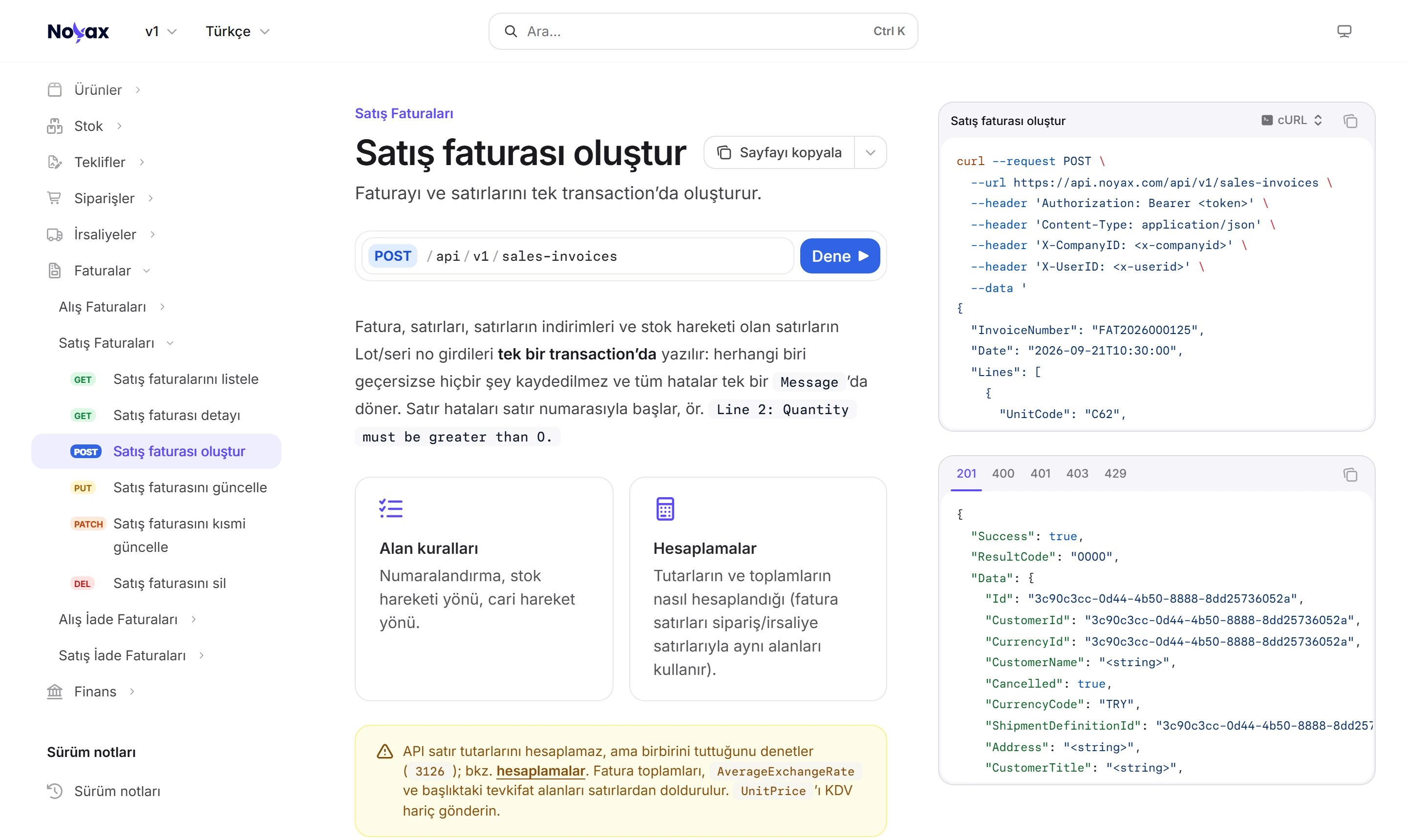
POST /api/v1/sales-invoices

The invoice, its lines and the stock movement are written in one go. Send “Next” instead of a number and it comes from the company’s series; the customer entry is created automatically.

Request

curl -X POST "https://api.noyax.com/api/v1/sales-invoices" \
  -H "Authorization: Bearer ACCESS_TOKEN" \
  -H "X-UserID: 12" \
  -H "X-CompanyID: 3" \
  -H "Content-Type: application/json" \
  --data '{
  "InvoiceNumber": "Next",
  "Date": "2026-11-22T10:30:00",
  "CustomerCode": "C0042",
  "Lines": [
    {
      "ProductCode": "CVT-M1040",
      "UnitCode": "C62",
      "Quantity": 200,
      "UnitPrice": 4.5,
      "CurrencyCode": "TRY",
      "ExchangeRate": 1,
      "VatRate": 20,
      "AmountExcludingTax": 900,
      "VatBase": 900,
      "VatAmount": 180,
      "AmountIncludingTax": 1080,
      "WarehouseName": "Merkez Depo"
    }
  ]
}'

Response 201 Created

{
  "Success": true,
  "ResultCode": "0000",
  "Message": null,
  "Data": {
    "Id": "c41e7b20-9a5d-4f83-b6c2-0d8e3a51f794",
    "InvoiceNumber": "NYX2026000000318",
    "Date": "2026-11-22T10:30:00",
    "CustomerCode": "C0042",
    "CustomerName": "Kuzey Paketleme A.Ş.",
    "CurrencyCode": "TRY",
    "SubTotal": 900,
    "VatTotal": 180,
    "GrandTotal": 1080
  }
}

GET /api/v1/finance/customers/balances

Debit, credit and balance per currency for every customer with a balance. Use asOfDate for the balance on an earlier date.

Request

curl "https://api.noyax.com/api/v1/finance/customers/balances?excludeZeroBalance=true&pageSize=2" \
  -H "Authorization: Bearer ACCESS_TOKEN" \
  -H "X-UserID: 12" \
  -H "X-CompanyID: 3"

Response 200 OK

{
  "Success": true,
  "ResultCode": "0000",
  "Message": null,
  "Data": {
    "Page": 1,
    "PageSize": 2,
    "TotalCount": 84,
    "Items": [
      {
        "CustomerId": "8d2f4a61-3c7e-4b19-a5d0-6e1f9b2c7a43",
        "CustomerCode": "C0042",
        "CustomerName": "Kuzey Paketleme A.Ş.",
        "Balances": [
          {
            "CurrencyCode": "TRY",
            "IsDefault": true,
            "Debit": 184250,
            "Credit": 151900,
            "Balance": 32350
          }
        ]
      },
      {
        "CustomerId": "e17a0c35-92b4-4d6f-8a1e-3b5c9d0f2a68",
        "CustomerCode": "C0057",
        "CustomerName": "Marmara Paketleme Ltd. Şti.",
        "Balances": [
          {
            "CurrencyCode": "TRY",
            "IsDefault": true,
            "Debit": 96400,
            "Credit": 96400,
            "Balance": 0
          },
          {
            "CurrencyCode": "EUR",
            "IsDefault": false,
            "Debit": 12400,
            "Credit": 9800,
            "Balance": 2600
          }
        ]
      }
    ]
  }
}

PATCH /api/v1/products/{productId}

Send only the fields you change: fields you leave out stay as they are, a field sent as null is cleared.

Request

curl -X PATCH "https://api.noyax.com/api/v1/products/5b7e2c90-1f4d-4a86-9c3b-e2d0a7f61b58" \
  -H "Authorization: Bearer ACCESS_TOKEN" \
  -H "X-UserID: 12" \
  -H "X-CompanyID: 3" \
  -H "Content-Type: application/json" \
  --data '{
  "ShelfNumber": "B-14",
  "Description": null
}'

Response 200 OK

{
  "Success": true,
  "ResultCode": "0000",
  "Message": null,
  "Data": {
    "Id": "5b7e2c90-1f4d-4a86-9c3b-e2d0a7f61b58",
    "Code": "RLM-6205",
    "Name": "Bearing 6205-2RS",
    "UnitCode": "C62",
    "StockType": 4,
    "VatRate": 20,
    "ShelfNumber": "B-14",
    "Description": null
  }
}

Every endpoint, field and error code is in the technical documentation: https://apidocs.noyax.com/en/v1

Each key reaches only the modules you allow

An API key has separate read and write permissions for each module: read allows GET requests, write allows POST, PUT, PATCH and DELETE. Requests to a module without permission are refused.

  • Read doesn’t include write, and write doesn’t include read; a key can be read-only.
  • Requests run on behalf of the user sent in X-UserID; the app shows who created or changed each record.
  • Records hidden with a sharing code stay out of the list if that user can’t see them.
Modules in the API
Module What you can do
Customers Customer cards with their addresses, phones, contacts and bank accounts
Products Product cards and critical stock definitions
Invoices Purchase, sales, purchase return and sales return invoices
Quotes Purchase and sales quotes
Orders Purchase and sales orders
Delivery notes Incoming and outgoing delivery notes
Stock Stock status of a product with its lot and serial number breakdown (read only)
Finance Customer transactions and balances; bank accounts, transfer, internal transfer, opening and credit card collection vouchers
Definitions Customer and product groups, parameter definitions, warehouses and sections

An invoice from the API follows the app’s rules

The invoice, its lines and the lot and serial number entries of lines with stock movements are written in one go. If any of them is invalid nothing is saved; all errors come back in a single response, with line numbers.

  • Send “Next” instead of a number and it comes from the company’s series — or, if you use e-invoicing, from the e-Invoice or e-Archive numbering.
  • The customer is found by code, or by tax number if that’s all you have; address, title and tax office come from the customer card.
  • The API doesn’t calculate line amounts but checks that they add up; invoice totals are filled from the lines.
Create sales invoice page in the technical documentation: POST /api/v1/sales-invoices, a curl request and the 201 response Enlarge image

Error messages say what happened

Every response comes in the same envelope: Success, ResultCode and Message. A successful request has code 0000; on errors the HTTP status, a four-digit code and the description come together, and multiple errors are listed one by one in Errors.

  • Token expired · 401

    Token has expired. Obtain a new token using the refresh token.

  • No permission for the module · 403

    You do not have permission for this operation.

  • Required header missing · 400

    X-UserID header is required.

  • Daily requests used up · 429

    Daily request limit (10000) exceeded.

Your remaining requests are in every response

Each key has a per-second and a daily request limit, shared by all your servers that use the key. The remaining requests come back in the headers of every response; the daily counter resets at midnight Turkey time.

  • A request stopped by the per-second limit doesn’t count against your daily limit.
  • Your daily limit depends on the tier of the API module you have.
Headers of a sample response
Header Meaning Value
X-RateLimit-Limit Requests per second 50
X-RateLimit-Remaining Left this second 37
X-Daily-Limit Requests per day 10000
X-Daily-Remaining Left today 9874

More API features

Paging and search
Lists come page by page, up to 50 records per page. search looks in customer names and finds the customer whose code, tax number or e-mail address matches exactly.
Full and partial updates
PUT replaces every field of a record; with PATCH you send only the fields you change (JSON Merge Patch).
Company and period
Each request works in the company given in X-CompanyID; send X-PeriodID and new records go to that accounting period.
Existing records
Try to add a customer or product whose code is already in use and the response returns the existing record’s ID.
Versioning
The version is in the address (/api/v1). A version marked deprecated keeps working for at least 6 more months.
Postman collection
Every endpoint, authentication included, is in a Postman collection with ready variables; import it and try right away.

Send your first request in minutes.

The Noyax API is a server-to-server REST API; requests and responses are JSON. The technical documentation covers every endpoint with its fields, examples and error codes, and the Postman collection lets you try them all with your own key.

  1. Key

    Noyax gives you your organization name and API key; the modules the key may read and write are set on it.

  2. Token

    You get a token with your key. It is valid for 20 minutes; when it expires, get a new one with the refresh token.

  3. First request

    Put the token in the Authorization header and the user and company in the X-UserID and X-CompanyID headers, then send the request.

Connect your software to Noyax.

Try it free for 14 days. No credit card needed.