Your confirmation letter goes out by e-mail, the answer comes back to Noyax

Calculate an account’s balance as of the date you choose and send it to your customers one by one or in bulk. Your customer replies without logging in and uploads the signed letter and their statement; every step is written to the confirmation’s history.

Each confirmation uses 1 credit when first sent; reminders are free.

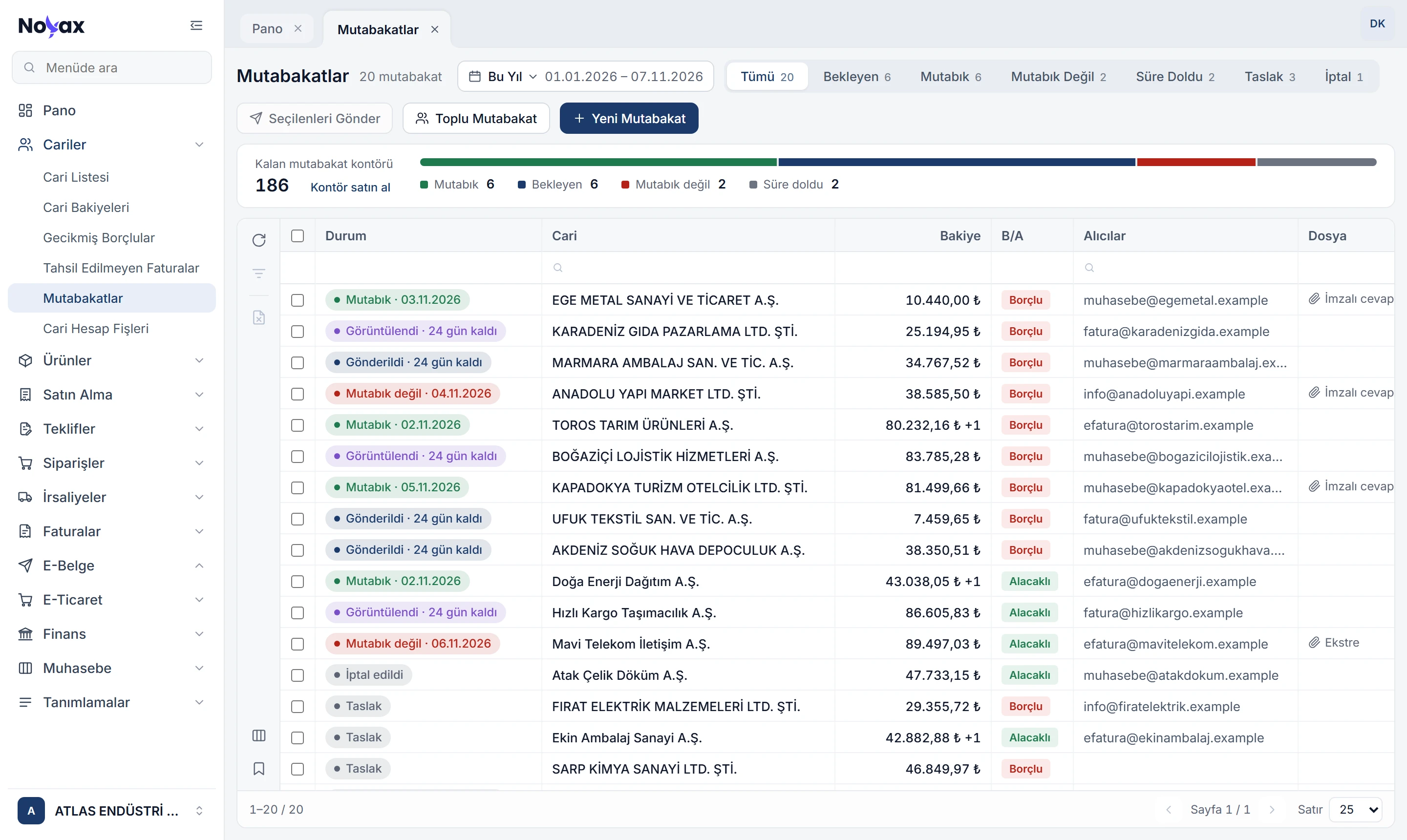
Reconciliations list in Noyax: remaining confirmation credits, status breakdown and a status such as Agreed, Viewed · 24 days left or Not agreed next to every account

One confirmation, two sides

You send, your customer replies. No paper, fax or phone calls in between; every step is recorded in Noyax.

  1. You

    The balance is calculated

    You pick the account and the date; the balance comes out of all movements up to that moment, per currency.

    TRY 184,560.40 Debit as of 31/10/2026 23:59
  2. Your customer

    An e-mail arrives

    Every recipient gets a personal link. Your customer opens the reply page without logging in. The e-mail is always sent in Turkish.

    ATLAS ENDÜSTRİ A.Ş.Cari hesap bakiye mutabakatı

    Sayın EGE METAL SANAYİ VE TİCARET A.Ş.,

    Şirketimiz nezdindeki cari hesabınız 31 Ekim 2026 tarihi itibarıyla aşağıdaki bakiyeyi vermektedir. Mutabık olup olmadığınızı aşağıdaki bağlantıdan bildirmenizi rica ederiz.

    TRY184.560,40 BORÇ

    Mutabakatı yanıtla Son cevap tarihi 1 Aralık 2026 · Referans kodu K7Q2MX
  3. You

    You see it was opened

    When a recipient opens the link, the status changes; the list shows how often it was opened and the days left.

    • Viewed · 24 days left
  4. Your customer

    They reply

    They choose whether they agree, add a note if they like, and upload the signed letter and their statement.

    We agree We do not agree
    mutabakat-imzali.pdf
  5. You

    The answer lands in Noyax

    The customer’s answer, the balance they reported and their files are on the confirmation’s detail page; the history is kept as evidence under the Turkish Commercial Code.

    • Agreed · 03/11/2026

Expired · deemed agreed If no answer arrives within 30 days, the customer is deemed to agree under Article 94 of the Turkish Commercial Code; the list shows this on its own.

All your accounts in one go

In bulk confirmation you choose the date and every account with a balance on that date is listed for you. You can narrow it to customers or suppliers, to balances above an amount, or to an account group.

  • Accounts that already have a confirmation awaiting an answer for that date are left unselected.
  • An account without an e-mail address stays a draft; it is sent once a recipient is added.
  • Requiring a statement when they disagree is a single switch.
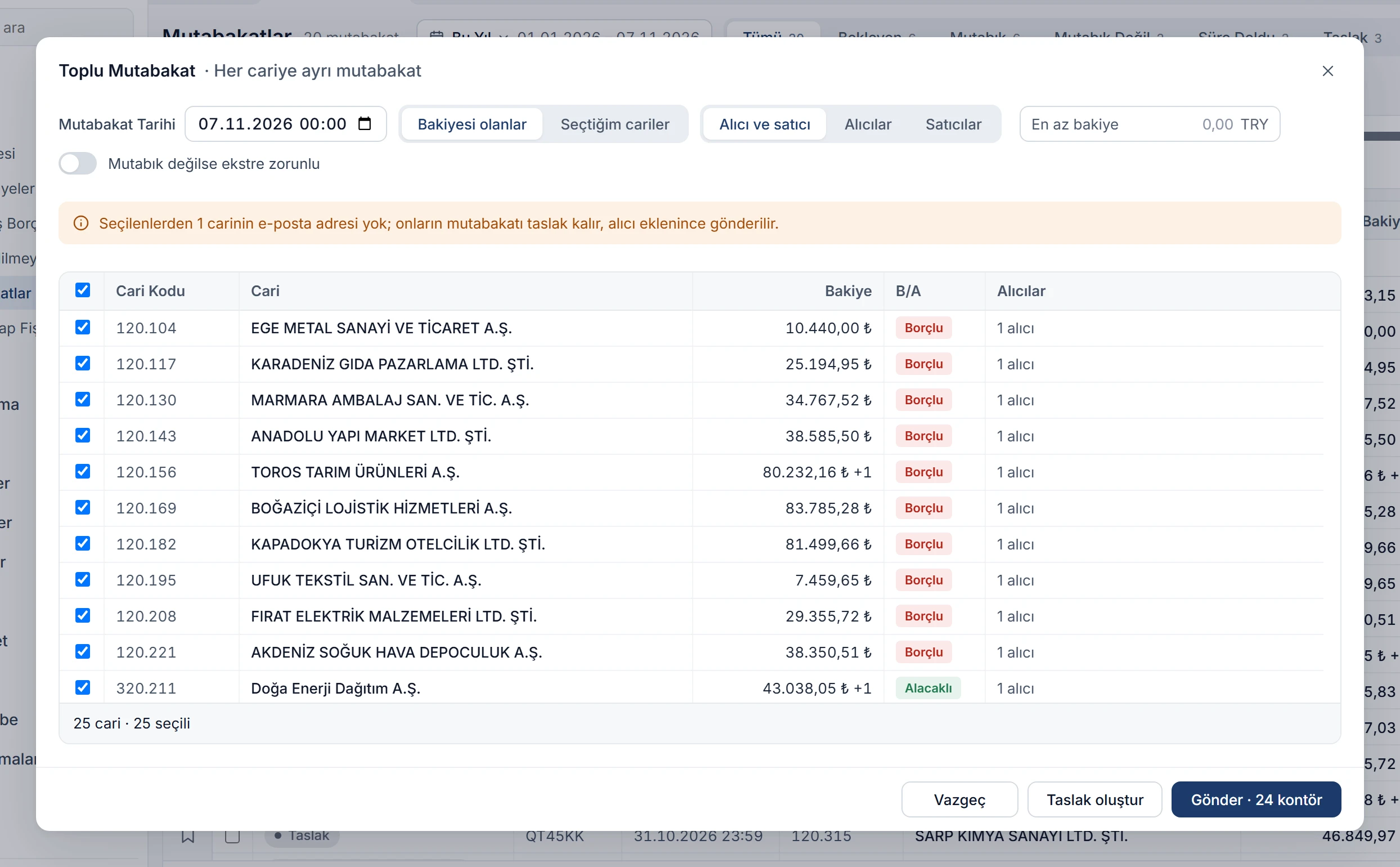
Bulk confirmation window: accounts with a balance selected, a warning for an account without an e-mail address and a Send · 24 credits button Enlarge image

Know what happens before you send

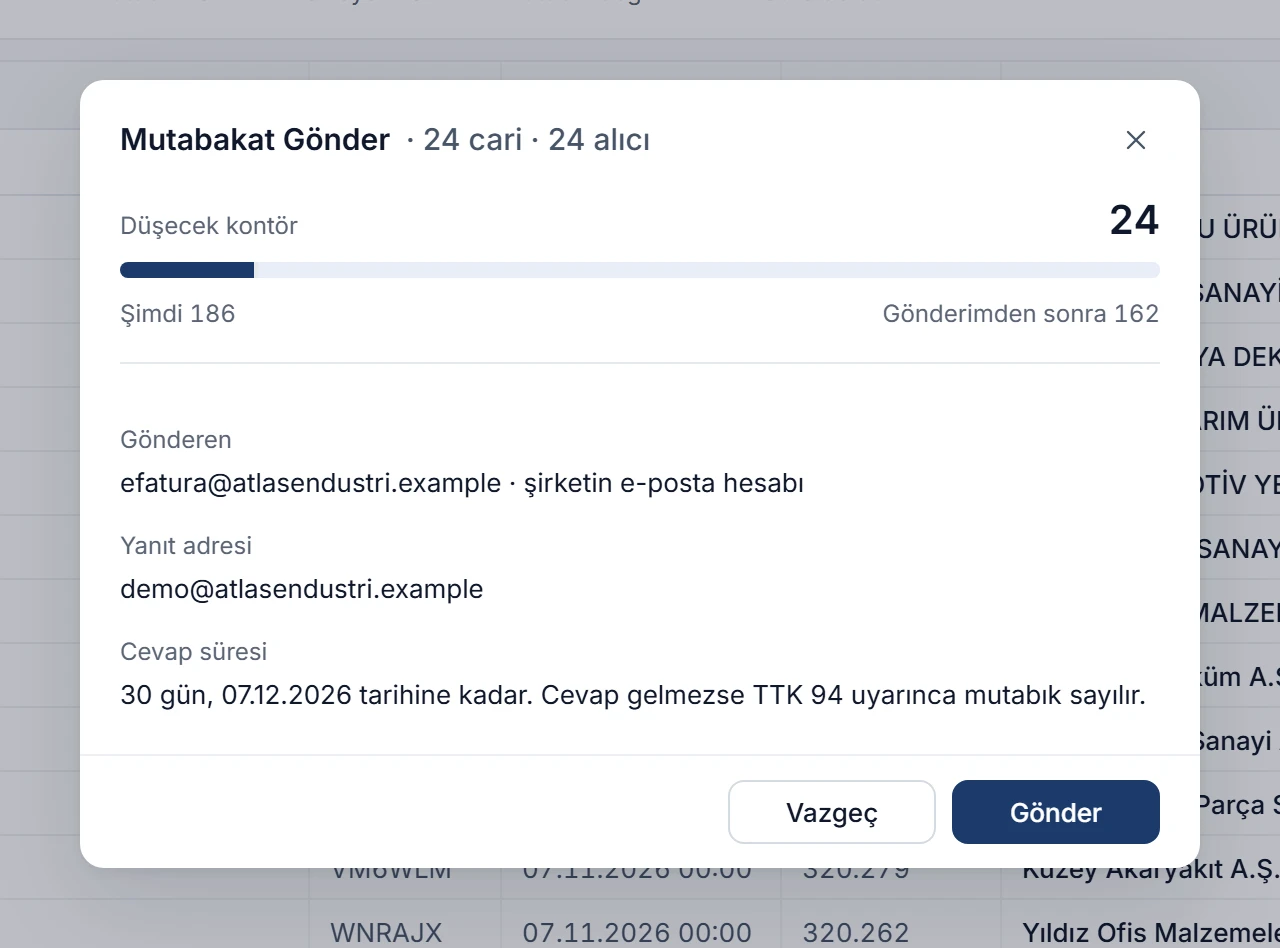
When you press Send, one window shows how many credits will be used, how many will remain, which account the e-mail goes from and where replies come back to.

  • If your company’s e-mail account is set up, confirmations go from it; replies come back to your address.
  • The reply deadline and the 30-day reminder appear in the e-mail and in the letter.
  • Confirmations go out in groups of ten, with progress shown in the window.
Send confirmation window: 24 accounts, credits to be used, sending e-mail account, reply address and the 30-day reply period Enlarge image

Answer, files and history together

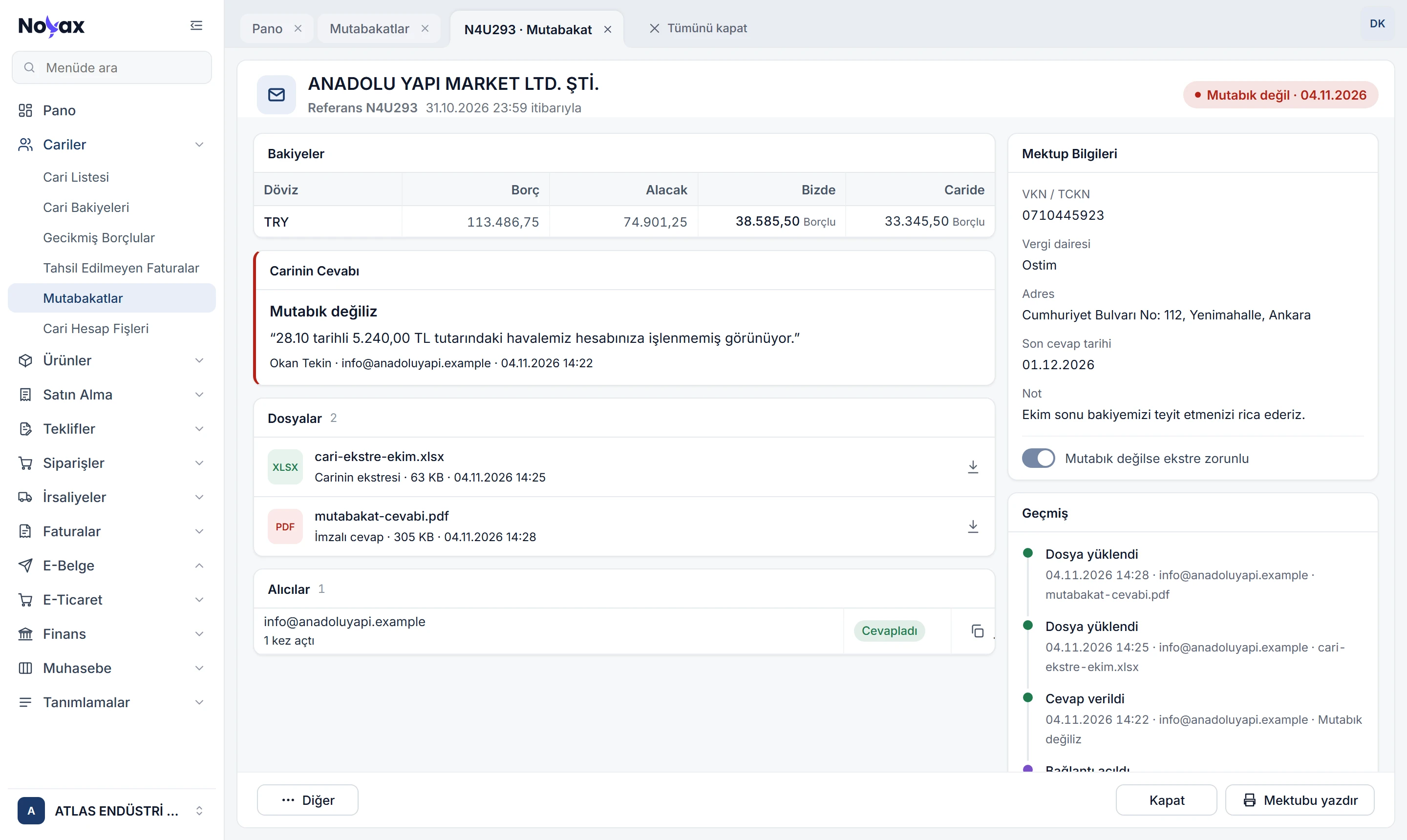
On the confirmation’s detail page, your balance and the balance on the customer’s side sit next to each other. The answer and note, the uploaded signed reply and statement, whether each recipient opened the link, and the full history are on the same screen.

  • Send a reminder for an unanswered confirmation in one click.
  • Copy any recipient’s link and pass it on through another channel.
  • The history keeps every step, from creation to answer, with its date.
Confirmation detail: the customer’s answer (not agreed) with a note, balances on both sides, the uploaded statement and signed reply, recipients and history Enlarge image

A letter on your letterhead

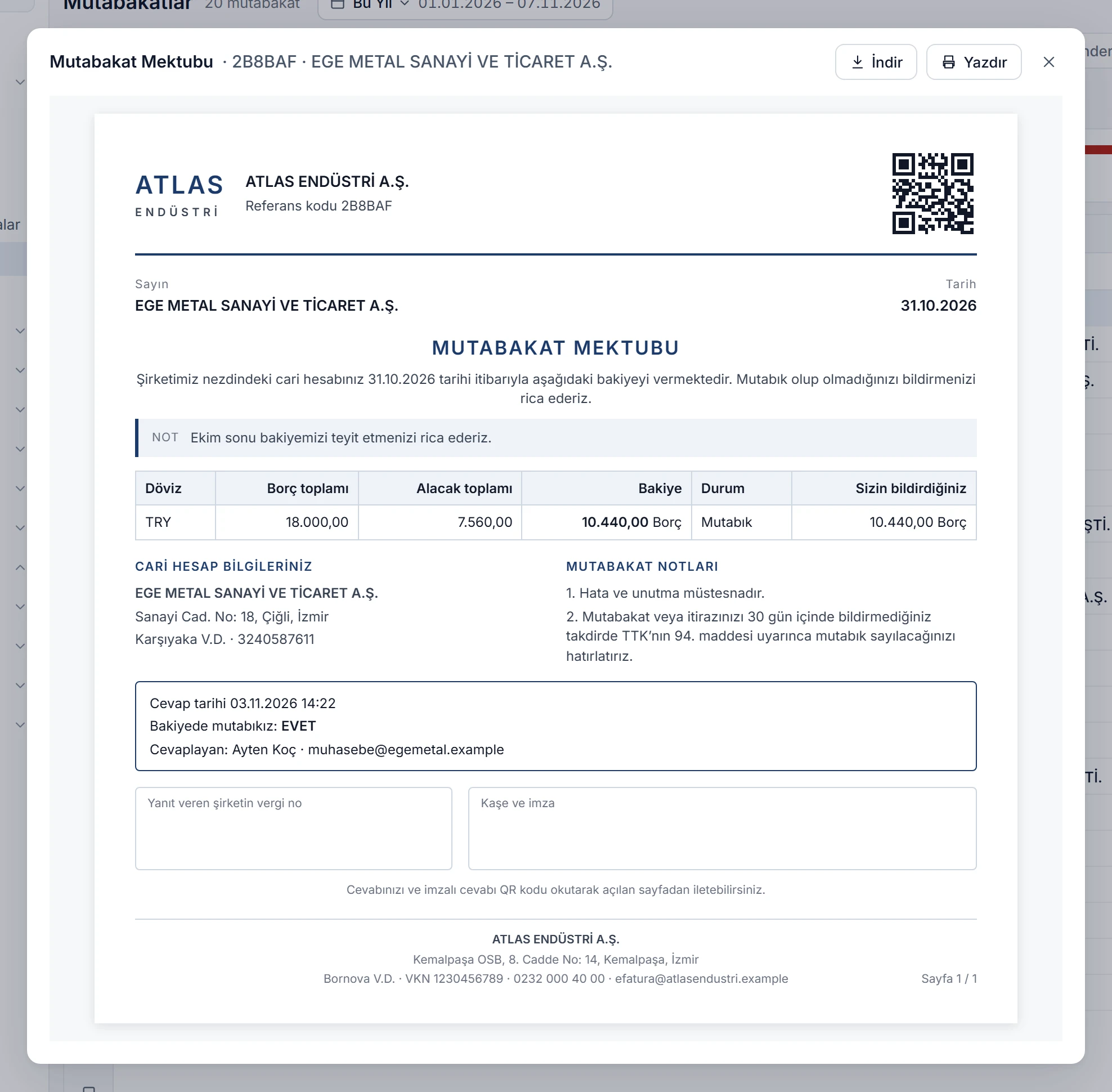
The confirmation letter is printed with your logo, the reference code and a QR code for each recipient. Scanning the QR code opens the reply page; once answered, the answer appears on the letter too.

  • Balances per currency, with the balance the customer reported next to them.
  • Stamp and signature area, the 30-day rule and the “errors and omissions excepted” note are included.
  • You can change the design in the report designer.
Confirmation letter: company logo, reference code, QR code, balance table, answer box, stamp and signature area Enlarge image

A separate link for each recipient

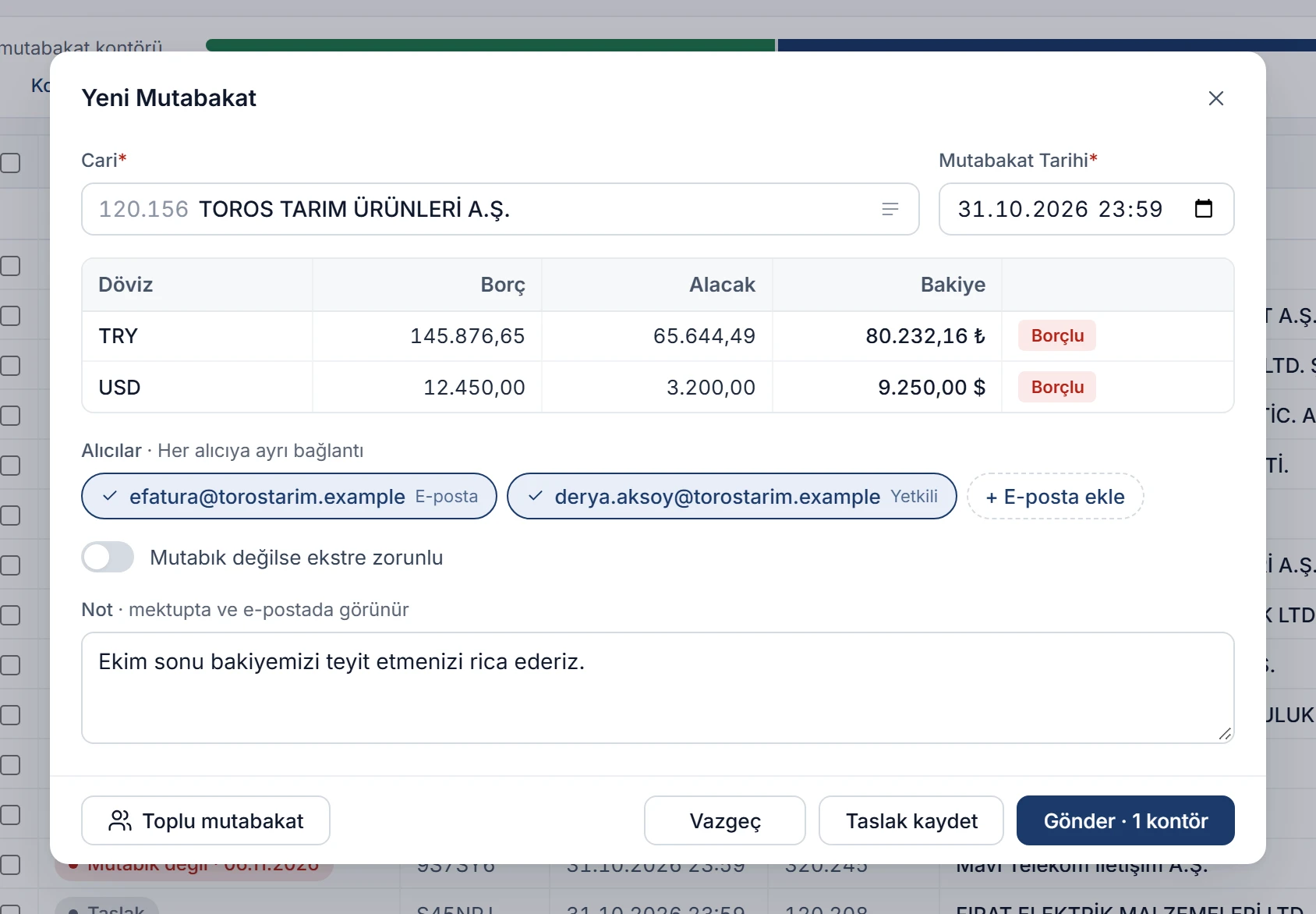
In a new confirmation, the balance is calculated as soon as you pick the account; its e-mail addresses and contact persons are suggested. You choose up to 10 recipients, and each gets their own link.

  • For foreign-currency accounts, each currency has its own row.
  • Confirmations cannot be dated in the future; the date defaults to the last day of the previous month.
  • The note appears in the letter and in the e-mail.
New confirmation window: account selected, TRY and USD balances, two recipients, the statement switch and a note Enlarge image

More conveniences

From account screens
Send a confirmation straight from the account list, account balances or the account statement.
Free reminders
Send a reminder for a confirmation awaiting an answer in one click; no credit is used.
Drafts and cancelling
Drafts can be edited or deleted; cancelling a sent confirmation closes its links.

Month-end confirmations from one screen.

Creating confirmations, sending them, and collecting replies and signed letters all happen in one place. The list shows who opened, who replied and whose time has run out.

  1. Load credits

    Your confirmation credits are loaded; the remainder appears above the list.

  2. Adjust the letter

    Change the ready-made letter design with your logo and colours in the report designer.

  3. Send

    Send to a single account or in bulk; replies appear in the list as they come in.

Do your month-end confirmations with Noyax.

Try it free for 14 days. No credit card needed.