
 Türkçe
 Deutsch
Year-End Closing Step by Step: What Happens in the Books at Year End?
How are the books closed at year end? From counts and reconciliations to adjusting entries, cost reflection and the closing and opening entries, we explain period-end closing in order, with one worked example.
What is period-end closing?
The invoices, payments and collections you record during the year all become accounting entries. But these entries are not enough to close the books on the last day of the year. Stock has to be counted, depreciation charged, foreign currency accounts revalued, income and expenses closed to find the profit for the period, and finally the books closed and the new year opened.
Together these tasks are called period-end closing. In Turkey the accounting period is the calendar year for most businesses, which is why this work is also called the year-end close. The account numbers in this article follow the Turkish Uniform Chart of Accounts.
Order matters at the end of the period. Each step uses the result of the one before: profit cannot be found correctly before the adjusting entries are made, the tax provision cannot be set aside before the profit is known, and no entries can be made for the year after the closing entry. We cover the steps in this order:
| Step | What happens? | Example accounts |
|---|---|---|
| 1. Preparation and reconciliation | Entries are completed; cash, bank and customer and supplier accounts are checked. | 100, 102, 120, 320 |
| 2. Inventory and adjustments | Stock is counted; depreciation, exchange differences and provisions are recorded. | 153, 257, 646, 656 |
| 3. Cost reflection | Expenses in group 7 are transferred to the income statement. | 770, 771, 632 |
| 4. Closing the income statement | Income and expense accounts are closed to the profit for the period. | 600, 621, 632, 690 |
| 5. Tax and net profit | The tax provision is set aside and net profit is carried to the balance sheet. | 691, 370, 692, 590 |
| 6. Trial balance and financial statements | The final trial balance, balance sheet and income statement are produced. | All accounts |
| 7. Closing entry | Balance sheet accounts are zeroed with a reversing entry. | Groups 1–5 |
| 8. Opening entry | The new year opens with the same balances. | Groups 1–5 |
We use the same example throughout: a trading company with sales of TRY 1,000,000 in a year.
Step 1: Complete your entries and reconcile
A sound close depends on complete records for the year. The first job is to go through the checks one by one:
- No missing entries. All purchase and sales invoices, expenses, and bank and cash movements for the year must be recorded and posted.
- Count the cash. The balance of account 100 Cash must match the cash in the till. The cash account cannot have a credit balance; if it does, an entry is wrong.
- Compare the banks. Compare the balance of each bank account in account 102 Banks with the year-end statement.
- Reconcile with customers and suppliers. Agree year-end balances with your customers and suppliers. Differences usually come from an invoice or payment that has not been recorded.
- Close VAT. In December's VAT entry, 391 VAT payable (output VAT) is offset against 191 Deductible VAT. If there is a balance to pay, it goes to 360 Taxes and funds payable; if there is a carry-forward, to 190 VAT carried forward.
- Look at reverse balances. A supplier account with a debit balance or a customer account with a credit balance usually points to an entry made to the wrong account. You can spot these easily in the trial balance.
Step 2: Count inventory and make adjusting entries
In this step your assets and liabilities are brought to their real values at the end of the year. Which entries are needed varies from business to business. The most common are:
- Stock count and cost of goods sold. Count and value your stock. Under the periodic inventory method, the cost of goods sold is found at the end of the period: opening stock + purchases during the period – closing stock. In our example, 150,000 + 750,000 – 200,000 = TRY 700,000. The entry: debit 621 Cost of trade goods sold, credit 153 Trade goods, TRY 700,000. Businesses that record cost with every sale only correct count differences.
- Depreciation. The annual depreciation of fixed assets is charged. The expense goes to a group 7 expense account depending on where the asset is used (for example 770 General administrative expenses for a vehicle used by management), and the other side to 257 Accumulated depreciation.
- Currency revaluation. Foreign currency cash, bank balances, receivables and payables are revalued at the year-end valuation rate, which the Revenue Administration announces at the end of every year. An increase in the rate is recorded in 646 Foreign exchange gains for receivables and 656 Foreign exchange losses for payables.
- Doubtful receivables. Unsecured receivables in litigation or enforcement are transferred to 128 Doubtful trade receivables, and a provision is set aside for them by debiting 654 Provision expenses and crediting 129 Provision for doubtful trade receivables.
- Discounting (rediscount). If you have receivables and payables backed by notes, they can be brought to their present value by deducting the interest for the time to maturity. This is optional under tax law, but if you apply it to notes receivable you must also apply it to notes payable.
- Accruals. Expenses paid in advance for next year go to 180 Prepaid expenses for future months. Expenses that belong to this year but have not yet been invoiced are recorded in this year through 381 Accrued expenses.
Any special procedures required by law for that year, such as inflation adjustment, are also carried out at this stage. Check with your accountant which apply to you.
Step 3: Reflect the cost accounts
In businesses that track their expenses in the group 7 accounts, the expenses that build up during the year are carried to the income statement at the end of the period. Under option 7/A, every expense account has a reflection account. For example, 770 General administrative expenses is closed with 771 General administrative expenses reflection account, and the amount is transferred to 632 General administrative expenses.
In our example, suppose TRY 100,000 of expenses have built up in account 770 during the year:
| Entry | Account | Debit | Credit |
|---|---|---|---|
| Reflection | 771 General administrative expenses reflection account | 100,000 | |
| Reflection | 770 General administrative expenses | 100,000 | |
| Transfer to the income statement | 632 General administrative expenses | 100,000 | |
| Transfer to the income statement | 771 General administrative expenses reflection account | 100,000 |
In manufacturing businesses, direct materials, direct labour and production overheads (710, 720, 730) are first transferred through their own reflection accounts to 151 Work in progress, that is, into the cost of production. Under option 7/B, expenses are collected by type in accounts 790–797 and carried to the income statement through 798 Expense types reflection account.
At the end of this step, no balances should remain in the group 7 accounts.
Step 4: Close the income statement accounts to 690
Income accounts have credit balances and are closed with a debit entry. Expense and cost accounts have debit balances and are closed with a credit entry. The other side of both is 690 Profit or loss for the period.
In our example, 600 Domestic sales has a credit balance of TRY 1,000,000, 621 Cost of trade goods sold a debit balance of TRY 700,000 and 632 General administrative expenses a debit balance of TRY 100,000:
| Entry | Account | Debit | Credit |
|---|---|---|---|
| Closing income | 600 Domestic sales | 1,000,000 | |
| Closing income | 690 Profit or loss for the period | 1,000,000 | |
| Closing expenses | 690 Profit or loss for the period | 800,000 | |
| Closing expenses | 621 Cost of trade goods sold | 700,000 | |
| Closing expenses | 632 General administrative expenses | 100,000 |
After this entry, account 690 has a credit balance of TRY 200,000. This is the profit before tax for the period. Had 690 ended with a debit balance, the period would have closed with a loss.
Step 5: Set aside the tax provision and find the net profit
Corporate tax is calculated not on accounting profit but on taxable profit, which is accounting profit plus non-deductible expenses, minus exemptions and allowances. Suppose the tax provision in our example is TRY 50,000:
| Entry | Account | Debit | Credit |
|---|---|---|---|
| Tax provision | 691 Provision for tax and other legal liabilities on profit | 50,000 | |
| Tax provision | 370 Provision for tax and other legal liabilities on profit | 50,000 | |
| Transferring the profit | 690 Profit or loss for the period | 200,000 | |
| Transferring the profit | 692 Net profit or loss for the period | 200,000 | |
| Transferring the tax provision | 692 Net profit or loss for the period | 50,000 | |
| Transferring the tax provision | 691 Provision for tax and other legal liabilities on profit | 50,000 | |
| Carrying net profit to the balance sheet | 692 Net profit or loss for the period | 150,000 | |
| Carrying net profit to the balance sheet | 590 Net profit for the period | 150,000 |
The net profit for the period is therefore TRY 150,000 and appears on the balance sheet in 590 Net profit for the period. In a loss year, the net loss goes to 591 Net loss for the period.
The provisional tax you paid during the year sits in 193 Prepaid taxes and funds. At the end of the period it is transferred to 371 Prepaid taxes and other liabilities on profit and offset against the provision in 370.
Step 6: Produce the final trial balance and financial statements
Take one last trial balance before the closing entry. In this final trial balance:
- Total debits and total credits must be equal.
- No balances should remain in groups 6 and 7; all of them should have been closed through 690 and 692.
- Cash, bank, customer and supplier balances must match the counts and reconciliations from step 1.
The balance sheet is prepared from the year-end balances of the accounts in groups 1–5. The income statement comes from the amounts in the group 6 accounts before the closing entries. The annual income or corporate tax return is based on these statements.
Step 7: Make the closing entry
The closing entry is the last entry of the year. The balances of the balance sheet accounts are zeroed with a reversing entry: accounts with debit balances are credited and accounts with credit balances are debited. Contra accounts such as 257 Accumulated depreciation are also closed by reversing their balances. No entries can be made for the year after the closing entry.
The year-end balances of our example business and the entries they receive in the closing and opening entries:
| Account | Year-end balance | Closing entry (31 December) | Opening entry (1 January) |
|---|---|---|---|
| 100 Cash | 20,000 debit | 20,000 credit | 20,000 debit |
| 102 Banks | 330,000 debit | 330,000 credit | 330,000 debit |
| 120 Trade receivables (customers) | 250,000 debit | 250,000 credit | 250,000 debit |
| 153 Trade goods | 200,000 debit | 200,000 credit | 200,000 debit |
| 320 Trade payables (suppliers) | 300,000 credit | 300,000 debit | 300,000 credit |
| 370 Provision for tax and other legal liabilities on profit | 50,000 credit | 50,000 debit | 50,000 credit |
| 500 Share capital | 300,000 credit | 300,000 debit | 300,000 credit |
| 590 Net profit for the period | 150,000 credit | 150,000 debit | 150,000 credit |
In both entries total debits and total credits are TRY 800,000. The TRY 200,000 in 153 Trade goods is the closing stock we counted in step 2.
Step 8: Open the new year with the opening entry
The opening entry is the first entry of the new year and the exact reverse of the closing entry. Balance sheet accounts open with last year's closing balances. The group 6 and 7 accounts start the new year at zero.
Last year's profit stays in account 590 in the new year. After the profit distribution decision, it is set aside as reserves, distributed to the partners or transferred to 570 Retained earnings.
Common mistakes
- Getting the order wrong. If an adjusting entry such as depreciation or an exchange difference is made after the income and expense accounts have been closed, the profit will be understated or overstated, and you will have to redo the closing entries.
- Leaving balances in group 7. Expenses that have not been reflected do not reach the income statement and are carried into the new year at the close.
- Calculating cost without counting. The cost of goods sold depends on the closing stock. An estimated stock makes the profit an estimate too.
- Leaving cash and account differences for later. A difference found after the close means the close has to be undone.
- Making entries for the year after the close. An entry made after the closing entry breaks the balance sheet and the opening entry.
Period-end operations in Noyax
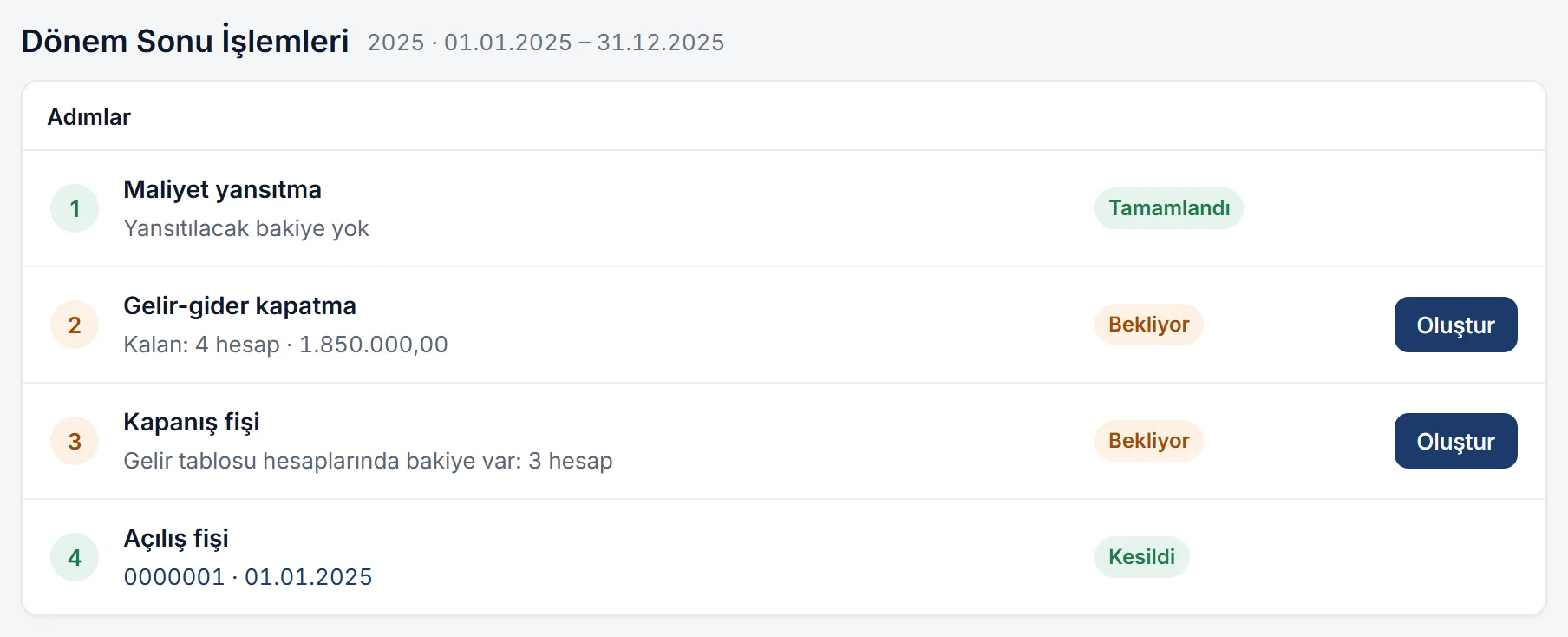
In the general ledger in Noyax you do not need to write the reflection, income-expense closing, closing and opening entries by hand. The Accounting › Period-end operations screen shows the four steps in order: Cost reflection, Income-expense closing, Closing voucher and Opening voucher. Next to each step you see its status: Waiting with the number of remaining accounts and the amount, Completed, or Issued with the voucher number.
- Reflections are predefined. Which account closes where is set in the Cost reflection and Income-expense reflection screens under Definitions › Accounting. With the default chart of accounts, the 7/A and 7/B reflections, closing group 6 to 690 and closing 690 and 691 to 692 come ready to use, and you can change them as you like.
- You see it first. Create first opens a preview: the vouchers to be created are listed with account, debit and credit, and the end of the period is suggested as the voucher date. Nothing is written until you confirm.
- Tax provision. If you enter the 691 and 370 entry before the income-expense closing, 691 is also transferred to 692 in the same operation. If you enter it afterwards, the step goes back to Waiting; just press Create once more.
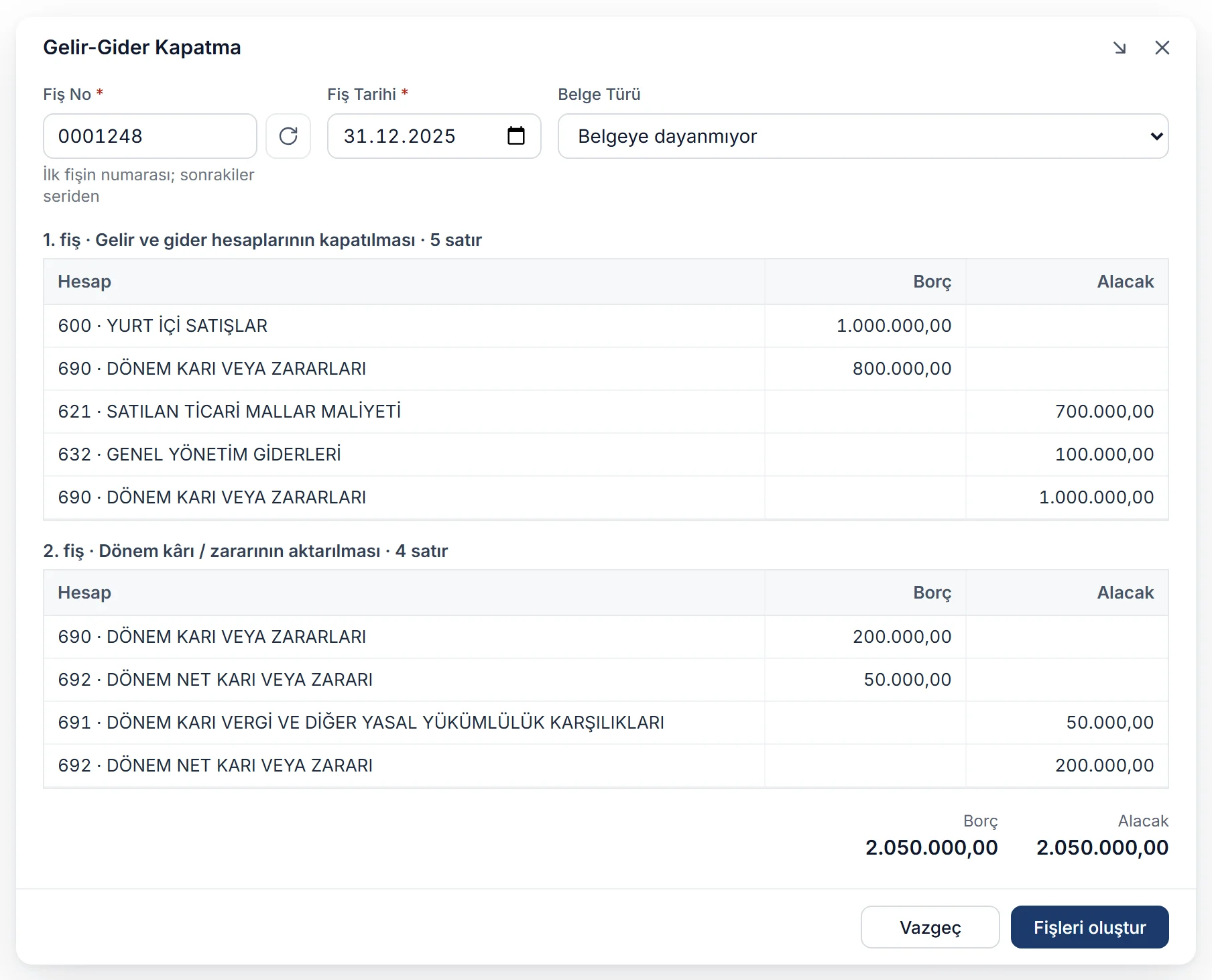
- The closing voucher protects the period. All accounts with balances are closed with a reversing entry, and Noyax warns you if balances remain in group 6 or 7. Once the closing voucher has been issued, vouchers can no longer be added or changed in that period. If a correction is needed, you delete the closing voucher and the period reopens.
- The new period opens in one window. After the close, the system administrator sees a new period window: a new period is opened, or the next one selected if it exists; the chart of accounts, account links and reflections are copied; and the opening voucher is issued with the balances of the closed period.
- Reports remain readable after the close. By default the trial balance and ledger leave out the closing voucher, so you still see the period's balances after the close.
You can transfer the net profit or loss in 692 to 590 or 591 with a journal voucher. The year's trial balance and ledger for checking the entries are in the same place.
Try Noyax free for 14 days and do your next period-end close on this screen.
Key takeaways
- Period-end work follows a set order: preparation, adjustments, reflection, closing income and expenses, tax and net profit, final trial balance, closing and opening.
- Adjusting entries such as cost of goods sold, depreciation, exchange differences and provisions must be made before the closing entries.
- Group 7 accounts close to group 6 through the reflection accounts, and group 6 accounts close to 690. The balance of 690 is the profit before tax.
- The tax provision is set aside in 691; 690 and 691 close to 692; net profit goes to 590 and net loss to 591.
- The closing entry zeroes the balance sheet accounts, and the opening entry starts the new year with the same balances.
Frequently asked questions
When is period-end closing done?
The entries are dated the last day of the accounting period, 31 December for most businesses. Preparations such as counts and reconciliations start at year end, while most of the entries are completed in the first months of the new year, before the annual tax return.
What is the difference between the closing entry and the opening entry?
The closing entry is the last entry of the year and zeroes the balances of the balance sheet accounts with a reversing entry. The opening entry is the first entry of the new year and reopens the same balances. Each is the exact reverse of the other.
What is the difference between accounts 690 and 692?
690 Profit or loss for the period is the account to which income and expense accounts are closed, and it shows the profit before tax. 692 Net profit or loss for the period is the account to which 690 and the tax provision in 691 are closed, and it shows the net profit after tax.
What happens if balances remain in group 7?
Expenses that have not been reflected do not reach the income statement, so the profit looks higher than it is. If the closing entry is made, these balances are also carried into the opening of the new year. Check that all group 7 accounts have been reflected before closing.
Can corrections be made after the closing entry?
Yes, but first the closing entry is reversed, the correction is entered and the closing entries are made again. In Noyax, deleting the closing voucher reopens the period. If the period was closed in Settings, the closing voucher cannot be deleted. For corrections after your books have been finalised, consult your accountant.


